Astrabotix Review: Beat the Custom GPT Retirement and Turn Your GPTs Into AI Apps
OpenAI lists 11 December 2026 as the standard retirement date for Custom GPTs. Astrabotix gives you a $27 kit to move them, and a platform that turns them into branded AI Apps and Bots. I tested the platform with my own key: here is what worked, what it costs and what does not transfer.
Custom GPT, portable kit, branded AI App or Bot.
Get Astrabotix + my bonuses → Launch: Nov 27, 11am EST to Dec 2, 11:59pm EST See my 3 bonus tools first ↓Short version: the $27 kit is a solid, honest walkthrough for getting your GPTs out before the retirement date, and the Astrabotix platform behind it is the strongest part. The template library, the AI App builder and the GPT importer all worked on the first try in my test. You bring your own AI key, and knowledge files and GPT Actions are rebuilt by hand.
What you get with Astrabotix
The launch has two layers. The front end gets your GPTs out before the deadline; the upgrade gives them a new home you control.
- Front end: the Custom GPT Migration Kit ($27). The Complete Migration Walkthrough video, a step-by-step PDF guide with screenshots and copyable prompts, conversion prompts, source inventory and testing worksheets, a worked example package and customer delivery templates. It covers the ChatGPT and Claude routes and a portable instruction file. Included: a Customer Installation Tutorial you may hand to your own customers.
- Upgrade: the Astrabotix platform. Form-first AI Apps, chat-first AI Bots, a template library, Knowledge Hubs from PDF, DOCX and TXT files, inline and popup embeds, and branded Launchpads that are public, private or gated. Sold as monthly plans or as a one-time Founders licence.
- Bring your own AI key. You connect OpenAI or Anthropic and pay the provider directly. Astrabotix adds no markup on tokens.
You do not need the upgrade to finish the migration. The kit stands on its own; the platform is for people who want to hand customers a finished tool on their own site instead of setup instructions.
What I tested in the Astrabotix members area
I got review access and connected my own OpenAI key. Four things I checked, in the order a new user would do them.
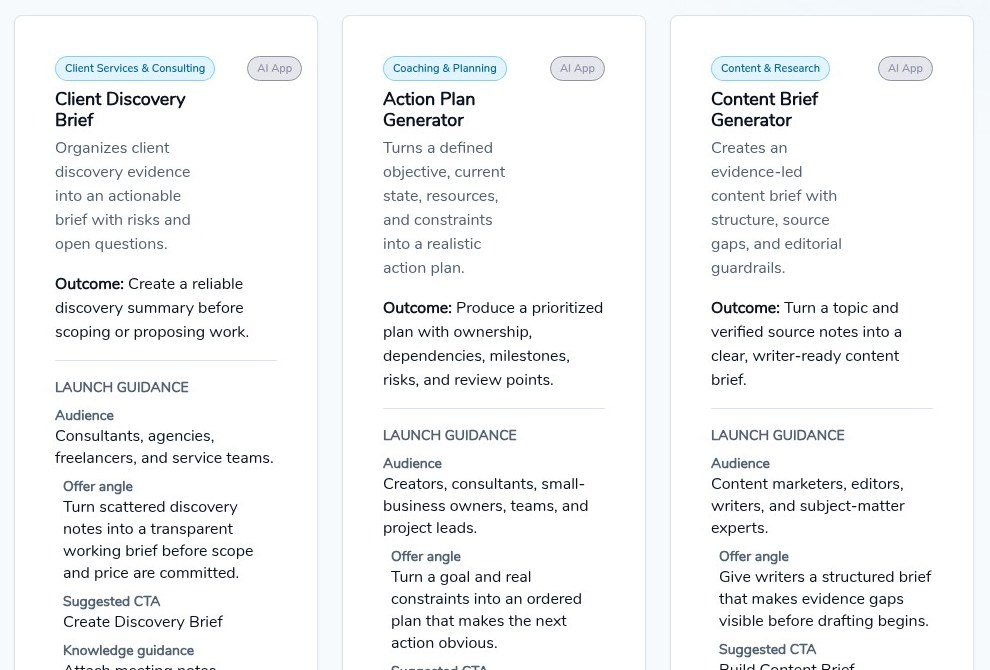
The template library: 12 App and Bot templates, each with audience, offer angle and suggested call to action.
1. An AI App from a template. I picked the Niche Lead Magnet Generator, which creates an editable App with five inputs and a finished prompt in one click. I filled it in for a beginner gardening niche. About 40 seconds later I had a complete concept: title, an honest promise, an eight-page outline, a troubleshooting table, opt-in bullets, email angles and where products could fit. It did not invent statistics or results.
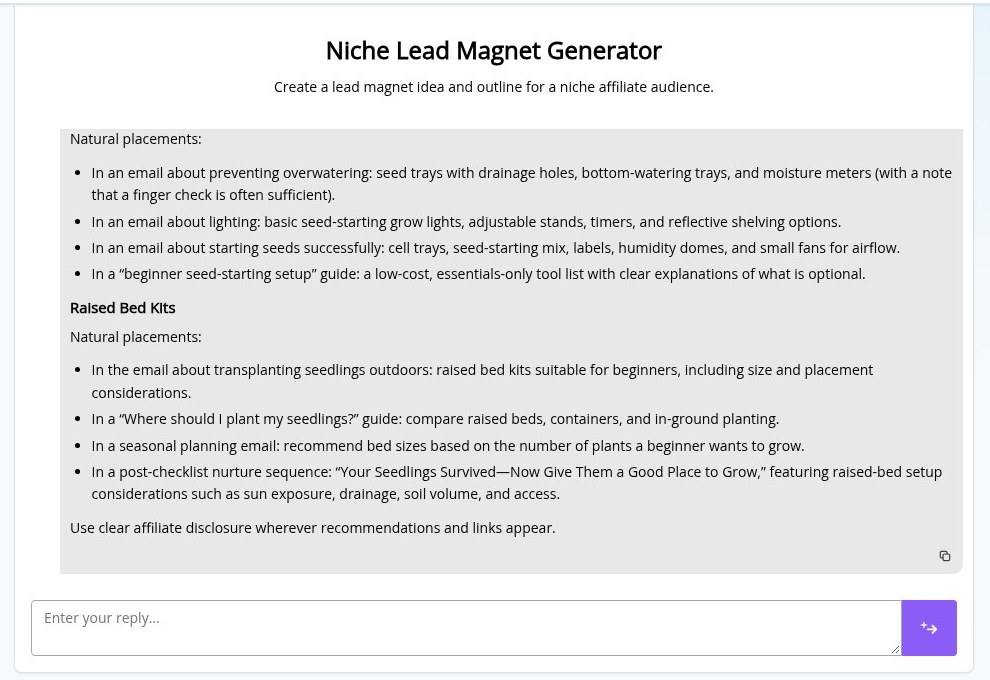
The end of the App's answer: where the affiliate products fit, with a reminder to disclose.
2. Importing a GPT. The importer takes a build document as a file or pasted text. A bookmarklet on the same page exports one from the ChatGPT editor for you. After “Analyze import” you get a review table before anything is created: instructions found, conversation starters, mapped tools and the model it picked, with a note for every change.
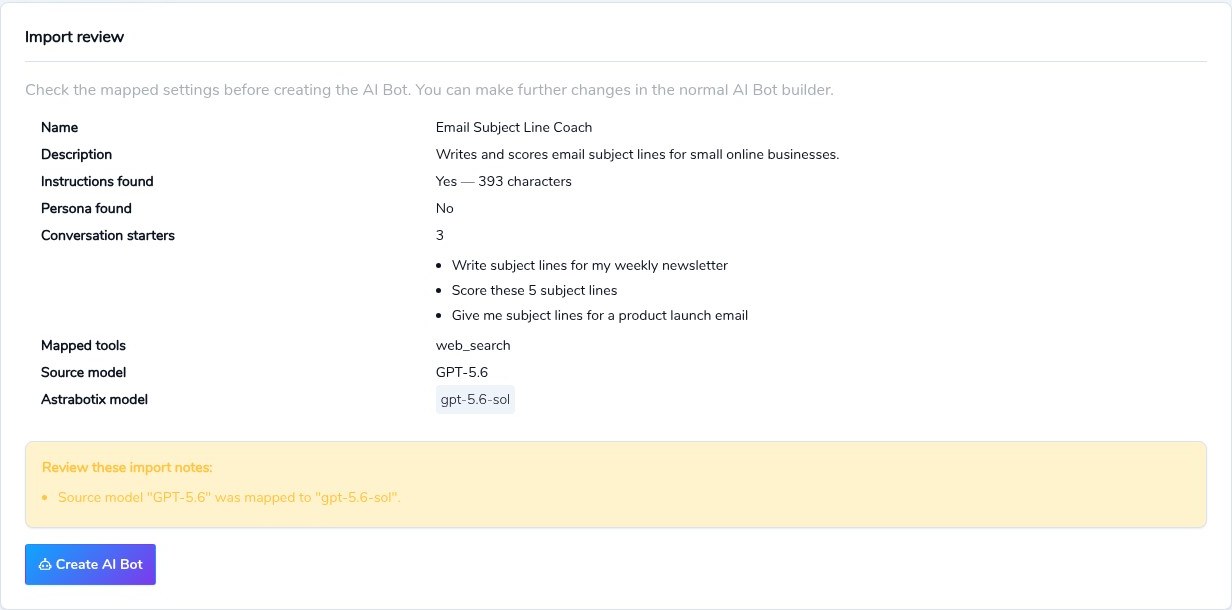
The import review for my test GPT: three starters, web search mapped, model mapped with a note.
3. The imported Bot. One click on Create AI Bot and it was a normal Bot. I asked it for subject lines for a Pinterest newsletter. It answered in about ten seconds and kept every rule from the original instructions: ten lines under 50 characters, the three to test first starred, each with a reason.
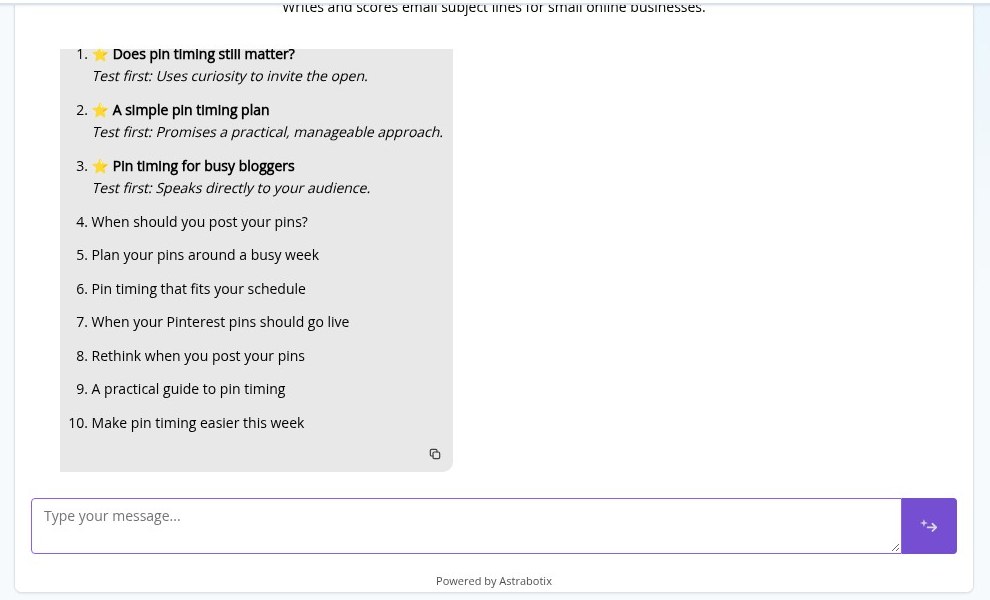
The imported Bot following its original instructions on the first message.
4. Embed and Launchpad. Embed / Preview gives you copy-paste code as an inline iframe or a popup button, with size, seven themes and a list of allowed domains. Launchpads package several Apps and Bots on one branded page, public, private or gated, with an optional email form that grants access right after sign-up.
The Custom GPT retirement, and what the Astrabotix importer moves
OpenAI lists 11 December 2026 as the standard retirement date for Custom GPTs. Exceptions apply by account and workspace, so check the notice in your own account and OpenAI’s Custom GPT retirement and migration FAQ. According to that FAQ, your past conversations stay accessible; what stops is the GPT itself. That is why saving the instructions and files comes first.
What the Astrabotix importer carries over, per the sales page:
| Part of your GPT | What happens |
|---|---|
| Name, description, instructions, persona | Mapped to the AI Bot settings for review |
| Conversation starters | Mapped to the AI Bot starters |
| Model label and Web Search | Mapped when supported, otherwise a fallback with a warning |
| Knowledge files | Not transferred. You add them again through a Knowledge Hub |
| Conversations, GPT Actions, connected integrations | Not transferred |
The sales page states that output parity is not guaranteed: an imported Bot should be reviewed and checked before it goes in front of customers.
My Astrabotix bonuses — for every buyer ($291)
Buy the $27 kit through my link and these three tools come with it. They work around the kit: save every GPT and find the next one to build, write the offer, and show the new version working.
GPT Backup & Graveyard Kit New — $127 value
Before you migrate anything, get every GPT you built out of ChatGPT, then look at whose GPTs are retiring too. A Chrome extension saves your own GPTs in one pass, and a scanner skill turns the retirement into your next tool idea.
- Saves every GPT you own (Chrome extension) — it opens the Configure page of each GPT you can edit and copies name, description, instructions, conversation starters and capabilities.
- One Markdown file per GPT — in the build-document layout the Astrabotix importer and the Migration Kit both read, so nothing has to be retyped.
- Knowledge file checklist — a list of every knowledge file each GPT uses, so you know which files to collect from your drive.
- Graveyard Scanner (Agent Skill) — searches the public GPT store in your niche for popular GPTs that will retire and lists who uses them and what they do.
- Replacement brief per find — for each GPT worth replacing: a tool idea, the audience, an angle and the first instructions draft, ready for the Offer Builder.
AI Tool Offer Builder New — $67 value
A migrated GPT is a chance to relaunch it. This skill reads your tool's instructions and writes the offer around it: as a lead magnet, a paid tool or a customer extra.
- Offer angle and name (Agent Skill) — three positioning options with a name, a one-line promise and the audience each one fits.
- Landing page copy — headline, bullets, how-it-works and FAQ for the page your tool or Launchpad sits on.
- Five launch emails — an announcement series for your list, written from what the tool actually does.
- Claim check — every line is checked against the tool's instructions, so the copy promises nothing the tool cannot deliver.
Bot Demo Video Maker New — $97 value
People buy an AI tool when they see it answer. This skill records your tool answering real questions in the browser and hands you a short demo video with a voiceover.
- Records the tool in action (Agent Skill) — works with an Astrabotix embed, a Launchpad, a Claude project or a ChatGPT project page, so the demo shows the real tool.
- Questions picked for you — three test questions written from the tool's instructions, the kind your buyers would ask.
- Voiceover and captions — a short narration over the recording plus burned-in captions, for viewers with the sound off.
- Two formats — a 16:9 video for the sales page and a 9:16 cut for Shorts and Reels.
With any upgrade — three more bonuses ($491)
Take a monthly plan or Founders Access through my link and you get three bonuses that put the platform to work: a course companion Bot, twenty ready builds to import, and a kit to sell AI tools to local businesses.
Course Companion Bot Builder New — $147 value
Turn a course or a PDF product you already sell into an AI companion your students can ask questions. The skill reads the course folder and builds everything Astrabotix needs.
- Reads your course folder (Agent Skill) — video transcripts, PDFs and worksheets are turned into clean Knowledge Hub files, one per module.
- Companion Bot instructions — a Bot that answers from your material, points to the right lesson and says so when the course does not cover a question.
- Conversation starters per module — so students see at once what they can ask.
- Student Launchpad text — title, description and welcome text for a private or gated Launchpad, ready to paste.
- Test questions with expected answers — ten checks from your own material, so you know the Bot is right before students use it.
Bot Blueprint Vault New — $147 value
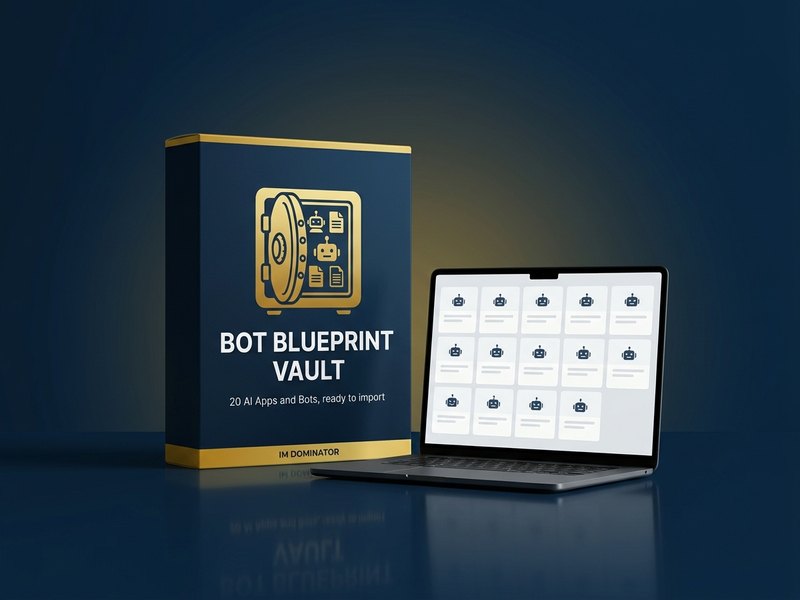
Twenty finished AI App and Bot builds for niches that buy, written in the import format Astrabotix reads. Import one, add your key, and you have a tool to embed or put in a Launchpad.
- 20 import-ready build documents (Markdown files) — each with name, description, instructions, conversation starters and settings, so a new Bot takes minutes instead of an afternoon.
- App specs with inputs — for the form-first Apps: the questions, field types and the prompt with the inputs in place, ready to paste into the App builder.
- Niches with buyers — local services, coaches, course creators, ecommerce and content creators, so every build has someone to sell it to.
- Test prompts per build — five realistic test messages for each one, so you check it before a customer sees it.
AI Tool Agency Kit New — $197 value
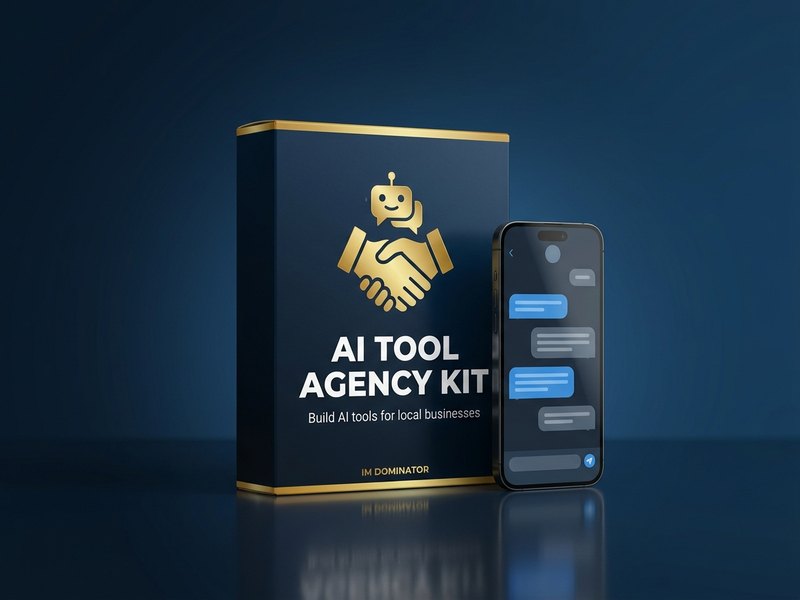
Astrabotix lets you build branded AI tools for other businesses. This kit is the selling side: find the client, show a working demo, send the proposal.
- Demo Bot Builder skill (Agent Skill) — give it a business website and it writes a demo Bot built on that business's own pages, to show on the first call.
- Outreach scripts — email, DM and call openers for five client types, built around the demo instead of a pitch.
- Proposal and pricing sheet — setup fee and monthly care plan options, with what each one includes, ready to send.
- Client handover pack — embed instructions, a monthly check routine and a report template, so the client keeps paying for upkeep.
Upgrade bonus total: $491. Take any Astrabotix upgrade through my link (a monthly plan or Founders Access) and all three are added to your bonus account.
Astrabotix price and upgrades
Front end price from the sales page; upgrade prices from the JV page on November 26, 2026, where they are still marked TBC.
| Level | What you get | Price |
|---|---|---|
| Front end | Custom GPT Migration Kit: video, PDF guide, prompts, worksheets, worked example, customer templates, installation tutorial | $27 one-time |
| Upgrade 1 | Astrabotix monthly plans: Starter 5, Growth 20 or Scale 100 AI Apps and Bots, Knowledge Hubs, embeds, Launchpads, templates, GPT import | $19 / $39 / $99 a month |
| Upgrade 2 | Astrabotix Founders Access: up to 500 AI Apps and Bots, no monthly platform fee, core updates. Limited to 50 licences | $497 one-time |
AI provider charges come on top of every plan and go straight to your provider. “Lifetime” on Founders means the supported life of the product, which the vendor expects to be about five years.
What stands out
- Cheap way to beat the deadline: $27 for a full walkthrough, prompts and worksheets
- Covers ChatGPT and Claude, plus a portable file for any other tool
- The importer worked: a clear review table, and the Bot followed its old instructions
- 12 useful templates with audience and offer angle, not empty shells
- Embeds and gated Launchpads with lead capture for your own site
- No token markup: you pay OpenAI or Anthropic directly
Good to know
- Knowledge files, GPT Actions and old conversations are not imported; you add files again in a Knowledge Hub
- You need your own OpenAI or Anthropic key, and its usage is billed separately
- Astrabotix takes no payments for you: paid access runs through your own checkout
Who Astrabotix fits
- You built Custom GPTs for yourself, your team or your customers and want them saved and running somewhere else before the retirement date.
- You sold or gave away GPTs as lead magnets or extras and need a version your customers can keep using.
- You want AI tools on your own site: a form-based App or a chat Bot in your colours, embedded or inside a members-style Launchpad.
- You coach, consult or teach and want to turn your material into a tool clients can ask questions.
How to claim the bonuses
- Get Astrabotix through a button or link on this page. Every one of them carries my affiliate ID, which links your purchase to the bonuses.
- Open my bonus page in JVZoo. After checkout, your purchase in your JVZoo account links my bonus page, with your bonus code on it.
- Enter the code on the claim page at imdominator.com/bonus-claim with your email. Your bonus area on IM Dominator unlocks.
- Took a monthly plan or Founders Access? Email me the JVZoo receipt ID of the upgrade (my address is on the bonus page). I’ll send you a second code within 24–48 hours. Enter it with the same email and the upgrade bonuses are added to the same account.
Questions about the Custom GPT retirement and Astrabotix
What is Astrabotix?
Astrabotix is a JVZoo launch by Matt Garrett. The $27 front end is the Custom GPT Migration Kit: video, PDF guide, prompts, worksheets and customer templates for moving a Custom GPT to ChatGPT projects, Claude or a portable instruction file. The upgrade is the Astrabotix platform for branded AI Apps and Bots that you embed on your site or put in a Launchpad.
Are Custom GPTs going away?
OpenAI lists 11 December 2026 as the standard retirement date for Custom GPTs. Exceptions apply by account or workspace, so check the notice in your account and OpenAI’s Custom GPT retirement and migration FAQ. According to that FAQ, past conversations stay accessible; the GPT itself stops.
How do I migrate a Custom GPT?
Save its name, description, instructions, conversation starters, knowledge files and capabilities first. Then rebuild it where you want it: a ChatGPT project, a Claude project or skill, or an AI Bot in Astrabotix, whose importer reads a GPT build document. Test it against a few of your old questions before you share it.
What does Astrabotix cost?
The Migration Kit is $27 one-time with a 30-day refund policy. The platform comes as monthly plans at $19, $39 or $99, or as Founders Access at $497 one-time; the JV page still marks the upgrade prices TBC. Your AI provider bills its usage separately.
Does the importer copy my whole GPT?
No. It maps name, description, instructions, persona, conversation starters, a recognised model and web search, and shows you a review table first. Knowledge files, GPT Actions, integrations and conversations are not transferred. You add files again through a Knowledge Hub.
Do I need the upgrade?
No. The kit is complete on its own and covers the ChatGPT and Claude routes. The upgrade is for turning your GPTs into branded tools on your own website or in a Launchpad.
Did you test Astrabotix?
Yes. With review access and my own OpenAI key I built an AI App from a template, ran it, imported a GPT build document, chatted with the new Bot, and went through the embed and Launchpad settings.
Bottom line
If you have Custom GPTs you or your customers still use, Astrabotix is an easy yes at $27: it gets them out in a structured way before the retirement date. The platform is the real surprise. In my test it turned a template into a working App in a minute and an imported GPT into a Bot that behaved like the original. Plan for your own AI key and for re-adding knowledge files, and you have a home for your GPTs that you control.