Type a topic, watch a real hand draw your video. My bonuses get it seen.
Skribbly writes the script, draws every scene with a photographed hand, adds the voice and hands you a finished whiteboard MP4. $17 once, no subscription, no timeline. My bonuses cover everything around the video: topics people search for, thumbnails in the same look, and every post that goes with it.
Stephanie Hayes’ own Skribbly demo: from a typed topic to a finished whiteboard video.
Get Skribbly + my 7 bonuses $17 one-time · 30-day guarantee · bonus code on the next page Buy through this page and the whole stack below is yours — you get your bonus code right after checkout.Short version: the whiteboard explainer used to mean VideoScribe, Doodly and an afternoon on a timeline — or a freelancer and a few days’ wait. Skribbly turns it into four steps in your browser, and the result reads as one connected board, not a slideshow. At $17 once, with your own AI keys at roughly $1–$3 per video, it’s a very easy yes.
What Skribbly actually is
Skribbly is a whiteboard video maker that runs in your browser (Chrome on desktop). You type a topic; it writes the script, a real photographed hand writes every heading letter by letter and draws the illustrations, a voice narrates it, and the camera pans from topic to topic before zooming out to reveal the finished board as one mind-map. You download a 1080p MP4 plus an .srt caption file. The whole thing takes four steps:
- Script. Type a topic — with audience, tone, language and 6, 9 or 12 scenes if you like — and click “Write script”. Regenerate it, or paste your own script and Skribbly plans the scenes around it, word for word.
- Look. Pick the hand (female or male, five skin tones, or no hand) and the pen width.
- Preview. Watch a silent preview of the whole video and edit any scene: heading, caption, drawings or narration. Add or delete scenes.
- Voice & generate. Pick one of 12 curated ElevenLabs voices, use Fish Audio or upload your own recording, add captions and music, click Generate. Download the MP4.
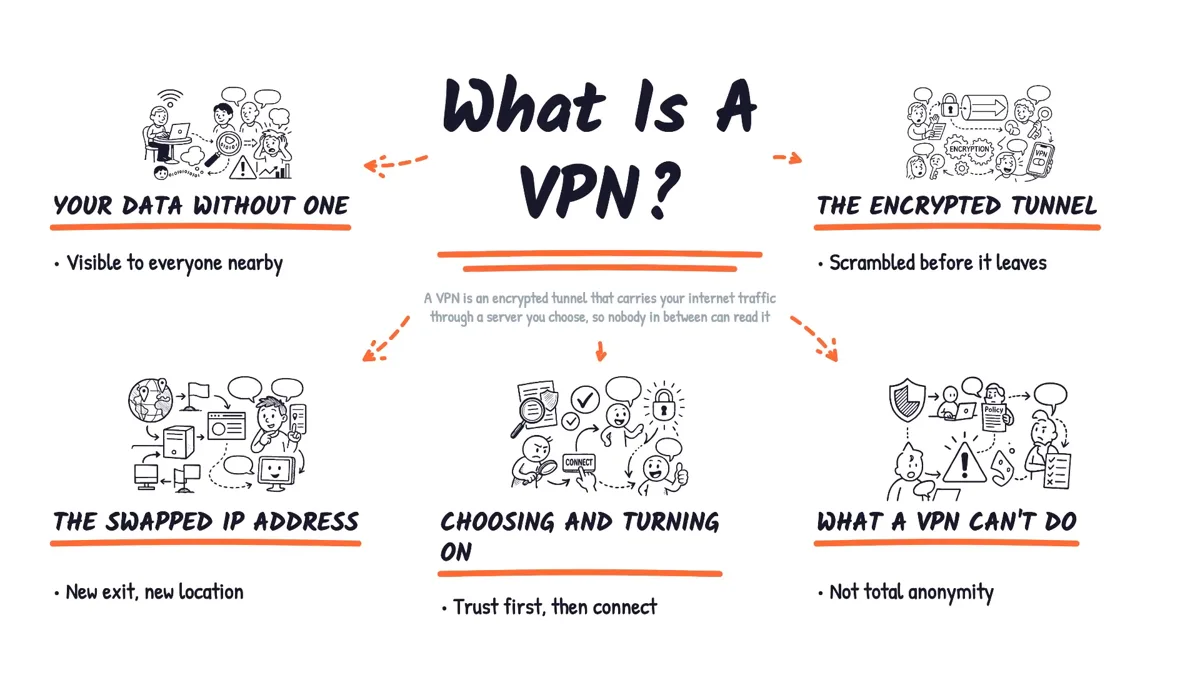
The final frame of one of Stephanie’s own sample videos (“What is a VPN?”): every heading and drawing on this board was written by the hand on camera, then revealed as one mind-map.
What you get for $17
- AI-written scripts — a title scene plus one scene per point; choose 6 (about 1.5–2 min), 9 (about 2:40) or 12 scenes (about 3–3.5 min).
- The real hand-drawn look — a photographed hand writes the headings and draws the illustrations, then the board joins up into a mind-map.
- Custom AI illustrations for every scene, traced into line art and drawn on the board.
- 12 curated voices plus Fish Audio or your own recording, with speed control.
- 32 languages — script, board text and captions. Japanese, Chinese, Korean, Arabic, Hindi and Tamil get a real handwriting font, and Arabic is hand-written right-to-left.
- Word-highlight captions + .srt and optional background music.
- A call-to-action end screen — your own text and link, written by the hand after the final reveal.
- Full preview and scene editor, 1080p MP4, one licence key for 2 devices.
What a video costs to run
Skribbly is bring-your-own-keys: you connect your own Anthropic, OpenAI and voice accounts and pay them directly, with no usage fee to Skribbly. By Stephanie’s own numbers:
| Part | Cost per video |
|---|---|
| Script (Claude) | under 10¢ |
| Illustrations (OpenAI) | about $1.25 (6 scenes) · $2.00 (9) · $2.75 (12) |
| Voice | per character with ElevenLabs or Fish Audio — free with your own recording |
| Total | roughly $1–$3 per video — her sales page lists freelancers at $135–$285 for one short video |
What I like — and what to know first
What’s good
- It reads as one board, not slides. The camera pans topic to topic and the final zoom-out reveals the whole idea as a mind-map — the part that makes whiteboard videos so watchable.
- A real photographed hand writes every heading letter by letter. No clip-art hand sliding across a slide.
- Four steps, no timeline. If you can type a topic, you can make one.
- Your own script, word for word — paste it and Skribbly plans the scenes around it.
- 32 languages with real handwriting fonts for six scripts, right-to-left for Arabic.
- The CTA end screen puts your offer and link on the board — ideal for affiliates and client work.
- $17 once, a 30-day guarantee, and your keys and projects stay in your own browser.
Good to know
- You bring your own AI keys (Anthropic, OpenAI and a voice). That’s what buys the one-time price.
- It records live in desktop Chrome, so a 90-second video takes about 90 seconds with the tab in front.
- The front end is 16:9. True vertical Reels, more boards and fonts, X vs Y and list videos are optional upgrades.
What I’m adding on top — where the video finishes, mine begin
Skribbly takes you from a topic to a finished whiteboard MP4. My bonuses work on both sides of that: before you type the topic (your keys set up, and topics people actually search for, with the facts to back them) and after the MP4 downloads (a thumbnail in the same hand-drawn look, a blog post, an email and every social post from the .srt Skribbly gives you).
I checked Stephanie’s funnel first so nothing overlaps: her upgrades add more looks, vertical Reels, comparison and list formats and a script writer. My stack is about finding the topic, publishing the video and turning it into traffic and income.
My Skribbly bonus stack — 7 bonuses, $439
Three packages: one for before you type the topic, one for after the MP4 downloads, one for where the videos earn.
Topic Scout — Chrome ExtensionNew — $144 value
Never stare at an empty topic box again. Find what people search for, then get the facts to script it.
- YouTube autocomplete keywords — scrapes the searches people actually type for any seed word, by language and country.
- Ten video topics from any page — a product page, an article or a YouTube transcript becomes ten ready topic ideas.
- A clean fact sheet in one click — copies a ready “facts to use” block or script brief to paste into Skribbly.
+ my Video Topic Goldmine AI Skill — 20 ranked video topics for your niche, each with a ready title and the likely search phrase.
The Publish & Rank Engine — $211 value
A finished video only earns once people find it. This package gives every video a thumbnail, a post and a ranking plan.
- Whiteboard Visual Studio — Agent SkillNew — hand-drawn whiteboard thumbnails, Shorts covers, pins and article images in the same look as your Skribbly video, built from frames of your own video. Three variants per video, in almost any language.
- Video-to-Post Repurposer — Agent SkillNew — feed it the .srt Skribbly exports and get a blog article, a newsletter email, a YouTube community post, an X thread, a LinkedIn post and a Facebook post from the same video.
- The YouTube Ranking Kit — the YouTube title templates, the CTR Boost cheat sheet and the LaunchJacking SOP in one pack.
The Explainer Profit Kit — $84 value
Skribbly ends every video with your own call-to-action and link. This package shows where to point it.
- The Affiliate Explainer PlaybookNew — the “What is X” explainer formula for affiliate offers, 20 fill-in topic formulas and where to post each one.
- The Faceless Channel Starter — the top faceless channel niches plus a ready content plan to fill your first month.
Upgrade or bundle — these unlock too
Stephanie offers upgrades after checkout (and a $97 bundle with everything). Take any Skribbly upgrade and these three are added to your bonus delivery — led by the tool that publishes your video for you. Take the bundle and you get all three plus a bundle-only bonus.
Video Meta Machine — Chrome Extension — $147 value
Your Skribbly video is done. This extension writes everything around it and sends it out for you.
- Reads your transcript — title options, a description with chapters, “what you’ll learn”, next steps and your own CTA + link, tags, first comment and image hooks.
- Built-in Hook Engine — five scroll-stopping hooks per video from seven proven hook families, plus ready 15–60 second teaser scripts for Reels, TikTok and Shorts.
- One video, every channel — a YouTube community post, an X thread, a LinkedIn post and a Facebook post from the same transcript.
- Publishes for you — sends the finished video straight to YouTube and your other channels. Post now or schedule it.
The Whiteboard Video Agency Kit — $97 value
- Three productized explainer packages — with pricing anchored on what Fiverr sellers charge for a short whiteboard video.
- Sample-first outreach templates — messages that open with a finished video about the client’s own FAQ instead of a pitch.
- Client intake + weekly delivery workflow — one page from brief to delivered MP4, plus 10 copy-paste templates.
The Multilingual Channel Kit — $67 value
- Multilingual Money Map — how to pick your second language, and the order to roll it out.
- Native Voice MapNew — a native-sounding ElevenLabs voice to try for each of the 32 languages Skribbly writes in, and how to get it into your video.
Explainer Mini-Course Builder — Agent Skill — $97 value
Only with the $97 Skribbly Bundle. Turn one topic into a whole whiteboard mini-course.
- The course plan — 3–7 lessons in the right order, each with one outcome and one action step.
- Paste-ready Skribbly scripts — narration sized for 6, 9 or 12 scenes for own-script mode, plus a scene plan per lesson.
- The funnel around it — a working opt-in page, a course page, three delivery emails and a listing, checked before you see them.
Upgrade bonus total: $311. Grab any Skribbly upgrade and all three are added to your bonus delivery. Bundle buyers get all three plus the Explainer Mini-Course Builder: $408 on top of the front-end stack.
Buying Captionly too? Captionly — Stephanie’s word-synced caption video tool, offered in this funnel — has its own separate bonus from me.
Start with the $17 front end →The upgrades are offered right after you buy — you don’t need to decide now.
What it costs
Skribbly — one-time price
- The full 16:9 whiteboard studio — AI script, real hand-drawn look, custom AI illustrations
- 12 voices plus Fish Audio or your own recording
- Word-highlight captions + .srt, background music, CTA end screen
- 32 languages, 1080p MP4, full preview and scene editor
- One licence key for 2 devices · 30-day money-back guarantee
You bring your own Anthropic, OpenAI and voice keys (roughly $1–$3 per video by the vendor’s figures). Optional upgrades after checkout: Theme & Font Pack, Skribbly Reels (9:16), X vs Y, Listicles and Retention Scripter — or the Skribbly Bundle at $97 with everything unlocked. None of them are needed to make great videos.
How to claim the bonuses
- Buy Skribbly through a button on this page. Every button here carries my affiliate ID — that’s what links your purchase to the bonuses.
- You land on my bonus page right after checkout, with your personal bonus code on it.
- Paste the code on the claim page with your email. Your bonus area on IM Dominator unlocks straight away, with everything in one place.
- Took an upgrade or the bundle? That purchase’s receipt links to its own bonus page with a code. Enter it with the same email and the extra bonuses are added on top.
Questions
Do I need any animation or video skills?
No. Stephanie’s line is “if you can type a topic, you can make one” — no editing software, no timeline, no design skill. You can still edit every scene in the preview if you want to.
What do I need to run it?
Google Chrome on a desktop computer, plus your own Anthropic key (script), OpenAI key (illustrations) and a voice — an ElevenLabs or Fish Audio key, or your own recording.
What does each video cost?
By the vendor’s figures, roughly $1–$3 in AI credits: under 10¢ for the script, about $1.25–$2.75 for the illustrations depending on 6, 9 or 12 scenes, plus your voice provider’s per-character rate — or nothing for the voice if you record it yourself.
How long are the videos?
Up to about three minutes: roughly 1.5–2 minutes for 6 scenes, about 2:40 for 9 and 3–3.5 minutes for 12.
Can I make videos in other languages?
Yes — 32 languages for the script, board text and captions. The built-in voices carry an English accent in other languages, so for native-sounding narration use a native ElevenLabs or Fish Audio voice or upload your own recording. My Native Voice Map upgrade bonus lists voices to try for every language.
Can I use it for client work?
Yes. The licence is personal and covers your own marketing and client work — you sell the videos, not the tool. My Whiteboard Video Agency Kit upgrade bonus shows how to package and price them.
How do I use the Agent Skills?
Each comes as a zip with a short quickstart PDF. In Claude you upload the zip once under Skills, switch it on, and then ask in plain English: “make 3 thumbnails from this video” or “turn this .srt into a blog post and social posts”. They also work in Claude Code.
Is there a guarantee?
Yes — 30 days on Skribbly and every upgrade. Reach out to the vendor within 30 days for a full refund.
Bottom line
Skribbly takes one of the most watchable video formats there is — the hand-drawn whiteboard explainer — and turns it into four steps in your browser for $17. The real photographed hand, the one-board mind-map reveal and the CTA end screen make it a genuinely useful tool for explainers, affiliate videos, courses and client work.
My seven bonuses cover both sides of the video: topics before you start, then thumbnails in the same look, a blog post, an email and every social post after the MP4 downloads. Upgrade buyers also get the Video Meta Machine that publishes it for them, the Agency Kit and the Multilingual Channel Kit, and bundle buyers get the Explainer Mini-Course Builder on top.
Not buying today? Grab my free “25 Whiteboard Video Topics That Get Clicks” instead →